
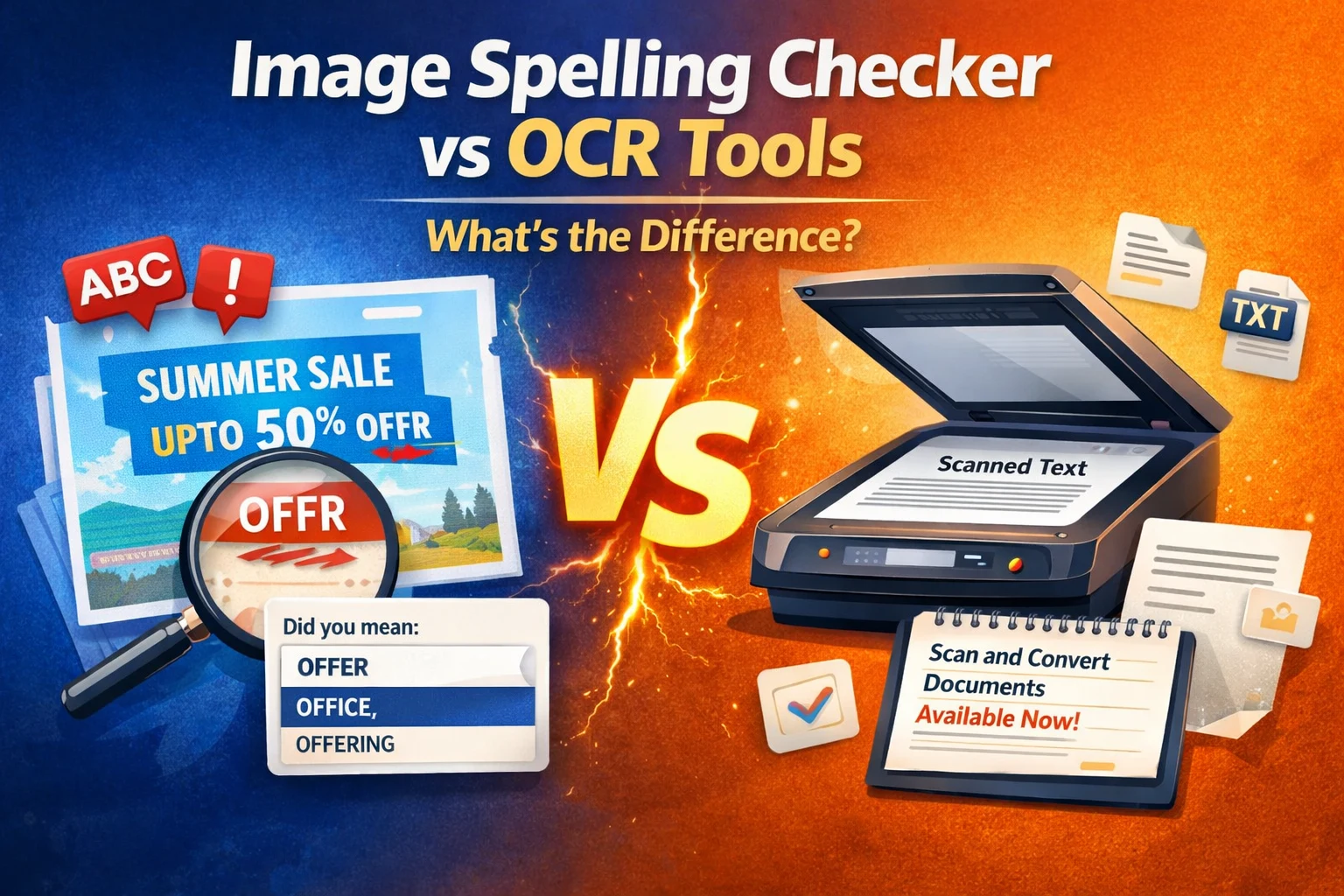
If you have ever spotted a typo inside a banner, ad creative, screenshot, or social media post, you know how frustrating it can be. That is where an image spelling checker becomes useful. However, many people confuse it with OCR tools.
Here is the short version:
- An image spelling checker finds and corrects spelling mistakes inside images.
- An OCR tool extracts text from images so you can edit or reuse it elsewhere.
They sound similar, but they solve very different problems. In this guide, you will clearly understand how each one works, when to use them, and why knowing the difference can protect your brand from costly mistakes.
What Is an Image Spelling Checker?
An image spelling checker is a tool that scans visuals and detects spelling or grammar errors in the text embedded inside them. It focuses on quality control for content that exists within images.
Unlike traditional spell checkers that work in documents or text editors, this tool analyzes text that appears in:
- Social media creatives
- Website banners
- UI mockups
- App screenshots
- Marketing ads
- Presentation slides
- Infographics
How It Works
- The tool scans the uploaded image.
- It detects visible text using text recognition.
- It checks the words against a language database.
- It highlights potential spelling or grammar mistakes.
This is critical for marketing and design teams because text inside visuals often bypasses standard proofreading systems.
What Is an OCR Tool?
OCR stands for Optical Character Recognition. An OCR tool converts text inside an image into editable digital text.
For example:
- You upload a scanned document.
- The tool reads the printed text.
- It converts the text into an editable format like Word or plain text.
Common Use Cases of OCR
- Digitizing scanned contracts
- Converting printed books to editable files
- Extracting text from invoices
- Copying text from screenshots
- Archiving physical documents
OCR is built for extraction and conversion, not proofreading or error detection.
Image Spelling Checker vs OCR Tools: Key Differences
Let us compare them clearly.
1. Purpose
Image Spelling Checker
- Identifies spelling and grammar mistakes inside visuals
- Focuses on quality assurance
OCR Tool
- Extracts and converts text from images
- Focuses on productivity and digitization
2. Output
Image Spelling Checker
- Highlights incorrect words
- Suggests corrections
- May integrate with visual review workflows
OCR Tool
- Produces editable text
- Does not automatically correct spelling
3. Target Users
Image Spelling Checker
- Marketing teams
- Designers
- Content creators
- Product teams
- Agencies
OCR Tool
- Administrative staff
- Legal professionals
- Researchers
- Archivists
4. Practical Example
Imagine your team launches a paid ad campaign. The design looks excellent, but one word is misspelled.
An OCR tool can extract the text from the banner, but it will not necessarily flag the spelling mistake.
An image spelling checker will scan the creative and immediately highlight the error before the campaign goes live.
That difference can protect your brand reputation.
When Should You Use an Image Spelling Checker?
Use an image spelling checker when:
- Reviewing ad creatives
- Auditing landing page banners
- Checking UI mockups before launch
- Validating social media visuals
- Performing design quality assurance
Creative teams often focus heavily on visuals and layout. Text accuracy sometimes becomes secondary. An image spelling checker adds an automated quality layer to prevent embarrassing mistakes.
Many modern feedback and collaboration platforms now include visual review workflows where teams can annotate, comment, and check for spelling issues directly within their creative process.
When Should You Use OCR Tools?
Use OCR when:
- You need editable text from printed documents
- You are converting paper files into digital archives
- You want to copy text from a scanned PDF
- You need to store searchable document data
OCR improves efficiency. An image spelling checker improves accuracy.
Both tools are useful, but they solve different problems.
Why This Difference Matters for Marketing and Product Teams
In 2025, content moves quickly. Campaigns launch fast. Teams collaborate remotely. Designers publish assets under tight deadlines.
Speed increases the risk of small mistakes.
Consider this:
- A typo in a paid ad reduces credibility.
- A spelling mistake in an app screen damages trust.
- An incorrect word in a product banner affects conversions.
OCR tools do not prevent these mistakes.
An image spelling checker does.
For creative and product teams, catching errors before launch is not optional. It directly impacts brand perception and user confidence.
A Unique Take: Extraction vs Validation
Most comparisons stop at functionality, but the deeper difference is strategic.
OCR extracts text.
An image spelling checker validates text.
Extraction helps you move content.
Validation helps you protect your brand.
For example:
OCR reads: “Limited Offer Avaliable Now.”
It converts that sentence into editable text.
An image spelling checker flags “Avaliable” as incorrect.
In marketing, validation carries more value than extraction.
You do not need the text copied.
You need the mistake caught.
That shift in perspective is important for modern teams.
Choosing the Right Tool for Your Workflow
Ask yourself:
- Do I need editable text from a document? Use OCR.
- Do I need to catch spelling errors inside creative visuals? Use an image spelling checker.
- Do I need structured review and collaboration along with text detection? Look for tools that combine visual feedback with automated checks.
The smartest teams build automated quality checks into their workflow instead of relying only on manual proofreading.
FAQs
1. Can OCR tools correct spelling mistakes?
Most OCR tools focus on extracting text. Some may include optional spell-check features, but error detection is not their main purpose.
2. Is an image spelling checker accurate?
Modern AI-powered tools are highly accurate when image quality is clear and readable. Performance depends on resolution and font clarity.
3. Do marketers really need an image spelling checker?
Yes. Text embedded in visuals often escapes traditional proofreading tools. Automated checks reduce risk before publishing.
4. Can these tools work on screenshots and mockups?
Yes. Advanced tools can scan banners, UI designs, social creatives, and website screenshots.
5. Should teams use both OCR and image spelling checkers?
If your workflow includes document digitization and creative production, using both tools makes sense. They complement each other.
Conclusion
At first glance, OCR tools and image spelling checkers may seem similar because both interact with text inside images. However, their goals are completely different.
OCR extracts text for editing and storage.
An image spelling checker protects your brand from visible mistakes.
If your focus is digitization, choose OCR.
If your focus is creative quality control, choose an image spelling checker.
In a fast-moving digital environment, small errors can create big problems. Understanding the difference between these tools helps you build smarter workflows and deliver polished, error-free content every time.

Leave a Reply